- 1. Understanding the Importance of iPhone Security
- 2. Enable Two-Factor Authentication (2FA)
- 3. Use a Strong Passcode
- 4. Keep Your iOS Updated
- 5. Configure App Permissions Wisely
- 6. Activate Find My iPhone
- 7. Utilize App-Specific Security Features
- 8. Consider a VPN for Public Networks
- 9. Regularly Monitor Your Accounts
- 10. Be Wary of Phishing Attempts
- 11. Use Secure Wi-Fi Connections
- 12. Regularly Review Device Settings
- 13. Conclusion
- 14. FAQs
iPhone Security Settings to Protect Banking Apps
In today’s digital age, protecting your personal information has never been more critical, especially when it comes to managing your finances through banking apps on your iPhone. With the increasing sophistication of cyber threats, ensuring that your iPhone’s security settings are optimized for banking apps is essential. In this post, we will explore various iPhone security settings that can help safeguard your banking transactions and personal data.
Understanding the Importance of iPhone Security
As mobile banking becomes the norm, understanding how to secure your iPhone is vital. Banking apps often store sensitive information, including account numbers, passwords, and transaction history. Any breach could lead to identity theft or unauthorized transactions. Therefore, configuring your iPhone’s security settings to protect these apps is imperative.
Enable Two-Factor Authentication (2FA)
One of the most effective ways to secure your banking apps is by enabling Two-Factor Authentication (2FA). This feature requires not only your password but also a second form of verification, typically a code sent to your phone or generated by an authentication app. To enable 2FA:
- Go to Settings.
- Tap on your name at the top of the screen.
- Select Password & Security.
- Tap Two-Factor Authentication and follow the prompts to set it up.
For more information, refer to Apple’s official documentation on Two-Factor Authentication for Apple ID.
Use a Strong Passcode
Your iPhone’s passcode serves as the first line of defense against unauthorized access. To enhance security:
- Go to Settings > Face ID & Passcode (or Touch ID & Passcode).
- Select Change Passcode.
- Choose a six-digit numeric code or an alphanumeric code for added security.
A strong passcode makes it considerably harder for someone to access your banking apps and other sensitive information.
Keep Your iOS Updated
Apple regularly releases updates to iOS to patch vulnerabilities and enhance security. To ensure that your iPhone is running the latest version:
- Open Settings.
- Tap on General > Software Update.
- If an update is available, tap Download and Install.
Staying up-to-date with the latest iOS version can protect your device from known security threats.
Configure App Permissions Wisely
Many banking apps require access to various functionalities on your iPhone, such as location services and notifications. Limiting these permissions can enhance your security. Here’s how:
- Go to Settings > Privacy & Security.
- Review permissions granted to each app, especially your banking apps.
- Disable any permissions that seem unnecessary for the app’s functionality.
For instance, if a banking app requests access to your contacts, you might want to reconsider that permission.
Activate Find My iPhone
In the unfortunate event that your iPhone is lost or stolen, having Find My iPhone enabled can help you locate it or protect your data. To enable this feature:
- Open Settings.
- Tap on your name at the top, then select Find My.
- Turn on Find My iPhone and Send Last Location.
With this feature, you can remotely lock your device or erase its data to prevent unauthorized access to your banking apps.
Utilize App-Specific Security Features
Many banking apps offer built-in security features such as biometric login (Face ID or Touch ID) and transaction alerts. Take advantage of these features to bolster your security. Typically, you can enable them within the app’s settings:
- Open your banking app.
- Navigate to the settings or security section.
- Activate biometric login and enable transaction alerts.
Being alerted to any suspicious activity quickly can help you respond appropriately and mitigate potential issues.
Consider a VPN for Public Networks
When accessing banking apps on public Wi-Fi networks, your data may be vulnerable to interception. Using a Virtual Private Network (VPN) can provide an additional layer of security. Here’s how to set it up:
- Choose a reliable VPN service and download its app from the App Store.
- Follow the setup instructions provided by the VPN service.
- Connect to the VPN before accessing your banking app on public Wi-Fi.
A VPN encrypts your internet connection, making it far more difficult for hackers to intercept your data.
Regularly Monitor Your Accounts
Even with all the security measures in place, it’s crucial to keep an eye on your banking transactions. Regularly checking your account statements can help you spot any unauthorized transactions early. Consider setting up alerts with your bank for large transactions or unusual activity.
Be Wary of Phishing Attempts
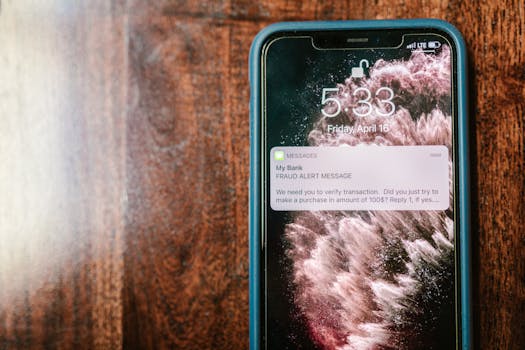
Phishing scams can trick you into providing your banking information. Always verify the source of any email or text message that requests sensitive information. If you receive a suspicious message asking you to click a link or provide personal information, it’s best to avoid it and contact your bank directly.
Use Secure Wi-Fi Connections
When accessing your banking apps, always use secure, private Wi-Fi connections whenever possible. Avoid using public Wi-Fi for sensitive transactions. If you must use public Wi-Fi, ensure you are connected to a VPN as mentioned earlier.
Regularly Review Device Settings
As security threats evolve, it’s essential to periodically review your iPhone security settings. Make it a habit to check your settings every few months or whenever a major iOS update is released. This ensures that you’re always protected against the latest threats.
Conclusion
By implementing these iPhone security settings, you can significantly reduce the risk of unauthorized access to your banking apps and personal information. From enabling two-factor authentication to using a VPN on public networks, each step you take enhances your overall security posture. Remember, vigilance is key when it comes to protecting your financial data.
FAQs
What should I do if I suspect my banking app has been compromised?
If you suspect your banking app has been compromised, immediately change your password and enable any additional security measures your bank offers, such as 2FA. Contact your bank to report the incident and follow their guidance.
Are there any risks to using banking apps on my iPhone?
Yes, using banking apps does come with risks, especially if security settings are not properly configured. However, by implementing strong security settings as discussed, you can minimize these risks significantly.
Can I use multiple banking apps on my iPhone securely?
Yes, you can use multiple banking apps securely by ensuring that each app is configured with strong security settings, including unique passwords and 2FA. Regular monitoring of your accounts is also advisable.
For more information on securing your iPhone, you can visit Apple’s official support page on iPhone Security.