Why Your iPhone Battery Health Drops Fast and How to Fix It
In today’s fast-paced world, our smartphones have become indispensable, and the iPhone is a favorite for many. However, one common concern among users is the fast decline of iPhone battery health. This issue not only affects performance but can also lead to inconvenience when you need your phone most. In this post, we will explore the reasons behind battery health degradation and provide actionable solutions to improve and maintain your iPhone’s battery life.
Understanding iPhone Battery Health
The iPhone battery health feature, introduced with iOS 11.3, allows users to check the maximum capacity of their battery relative to when it was new. A battery’s health can drop for several reasons, including age, usage patterns, and environmental conditions. Apple provides a detailed explanation of battery health on their official support page.
Common Reasons for Fast Battery Health Decline
Several factors contribute to the rapid decline of your iPhone’s battery health. Here are some of the most common causes:
- Frequent Charging Cycles: Each time you charge your iPhone, it goes through a cycle. Over time, repeated charging can wear down the battery’s capacity.
- High Temperatures: Exposure to extreme heat can adversely affect battery performance. Operating your iPhone in temperatures above 95°F (35°C) can lead to permanent damage.
- Background App Activity: Apps running in the background can drain your battery faster than you might expect.
- Battery Age: Like any rechargeable battery, the lithium-ion battery in your iPhone has a finite lifespan, generally lasting about 2-3 years before significant degradation.
- Software Issues: Bugs or inefficient software can lead to higher battery consumption. Keeping your iOS updated is crucial to maintaining battery health.
Signs That Your iPhone Battery Health is Dropping
It’s essential to recognize the signs that indicate your iPhone’s battery health is declining:
- Fast Battery Drain: If your iPhone loses charge rapidly even with minimal usage, it’s a clear sign of battery health issues.
- Unexpected Shutdowns: An iPhone may turn off unexpectedly when the battery level shows there is still charge left.
- Charging Issues: If your iPhone takes an unusually long time to charge or doesn’t charge at all, it may indicate battery health problems.
- Battery Health Percentage: You can check your battery health by navigating to Settings > Battery > Battery Health. If it’s below 80%, it’s time to consider a replacement.
How to Fix and Improve Your iPhone Battery Health
While some factors affecting battery health are beyond your control, there are several methods you can use to help maintain and improve your iPhone’s battery performance:
1. Optimize Your Charging Habits
To prolong your battery’s lifespan, avoid letting it drop to 0% frequently. Additionally, consider using the Optimized Battery Charging feature, which learns your charging routine and reduces the time your iPhone spends fully charged. Enable this feature in Settings > Battery > Battery Health.
2. Manage Background App Activity
Many apps run in the background, consuming battery life. To manage this:
- Go to Settings > General > Background App Refresh and disable it for apps that do not need it.
- Close apps that you are not using by double-tapping the home button and swiping up on the app windows.
3. Control Location Services
Location services can significantly drain your battery. To manage this:
- Navigate to Settings > Privacy > Location Services.
- Set location access to ‘While Using’ for apps that don’t need to track your location constantly.
4. Reduce Screen Brightness and Timeout
Your screen is one of the most power-hungry components. Lowering the brightness and setting a shorter auto-lock time can help:
- Adjust brightness in Settings > Display & Brightness.
- Set auto-lock to 1 minute in Settings > Display & Brightness > Auto-Lock.
5. Update to the Latest iOS Version
Keeping your iPhone updated ensures you have the latest performance improvements and bug fixes. Go to Settings > General > Software Update to check for updates.
6. Check Battery Usage by App
Understanding which apps consume the most battery can help you make informed decisions about app usage:
- Access this in Settings > Battery and review the battery usage by individual apps.
7. Use Low Power Mode
Low Power Mode is an effective way to extend battery life when you’re running low. Enable it via Settings > Battery > Low Power Mode.
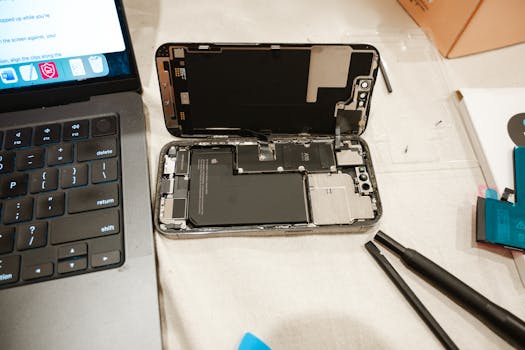
8. Consider a Battery Replacement
If your iPhone battery health is significantly low (below 80%), consider getting the battery replaced. Apple offers battery replacement services, which can be found on their official page.
When to Seek Professional Help
If you’ve tried all the above tips and continue to experience battery issues, it may be time to consult a professional. Apple’s support team can run diagnostics to determine if your battery requires replacement or if other underlying issues exist.
FAQs
What is considered good iPhone battery health?
A good battery health percentage is typically above 80%. If it drops below this threshold, your device may not perform optimally.
How often should I charge my iPhone?
It’s best to charge your iPhone when it drops to around 20% and unplug it when it reaches 80%-100% to optimize battery health.
Does using a case affect battery health?
Some cases can trap heat, which may lead to faster battery degradation. It’s advisable to use a case that allows for ventilation.
Can I improve battery health after it has dropped?
While you cannot restore battery health to its original condition, following best practices can help extend its life and improve performance.
By understanding the factors that contribute to fast battery health decline and implementing these strategies, you can significantly improve your iPhone’s battery performance and longevity. Remember to regularly check your battery health and consider professional help when necessary.